Why bother?
Let me lead with the result, in case you’re deciding whether to read on: a 2016-era dual-Xeon server with no free GPU runs a 30-billion-parameter model at about 23 tokens per second. That is fast enough to chat with, script against and learn from, and it cost nothing but an evening.
I wanted to understand LLM inference from the inside: how quantization trades quality for speed, why thread counts matter, and what actually limits generation speed. Papers and blog posts only get you so far; at some point you have to run the experiment yourself. So I did, on hardware I control, with a stopwatch (well, llama-bench) in hand.
The catch is the hardware. My homelab’s main Proxmox host is a Supermicro server with two Broadwell Xeons, and its two GPUs are already spoken for: one transcodes media, the other records cameras. So this is a CPU-only build. What follows is what that buys you, with real numbers and the occasional confession about what I got wrong.
The hardware, and the one number that matters
On paper the server is generous: 44 cores and 256 GB of RAM. For LLM inference, though, the spec that matters is one most spec sheets bury: memory bandwidth per socket, which here is about 77 GB/s.
| Component | Spec |
|---|---|
| Platform | Supermicro X10DRi, Proxmox VE 9.2 |
| CPU | 2× Intel Xeon E5-2699 v4 (Broadwell), 22 cores / 44 threads each, AVX2 + FMA, no AVX-512 |
| Memory | 8× 32 GB DDR4-2400 = 256 GB, 4 channels per socket |
| NUMA | 2 nodes, one per socket |
| GPU | 2× Quadro P2000 5 GB, both passed through to other VMs, so unavailable |
| Storage | ZFS mirror on SATA SSD, 1.5 TB free |
Here’s why. When a model generates text, every new token requires reading all of the model’s weights from RAM, once. The arithmetic is almost an afterthought; shovelling the weights from memory to the cores is the real job. Four channels of DDR4-2400 move at most 4 × 19.2 = 76.8 GB/s, so a 5 GB model can produce at most about 15 tokens per second, however many cores you throw at it. Nearly every result below is a footnote to that one fact.
It also explains two things that surprised me until I thought about them properly: why a pile of cores doesn’t make a CPU fast at inference, and why the second socket barely helps. Memory attached to the other socket has to cross the inter-socket link, which is noticeably slower than local memory, and a model that straddles both sockets pays that penalty on every token.
Architecture
Everything lives in one VM, pinned to a single socket so that every byte of model weights comes from local memory. The layout is deliberately boring:
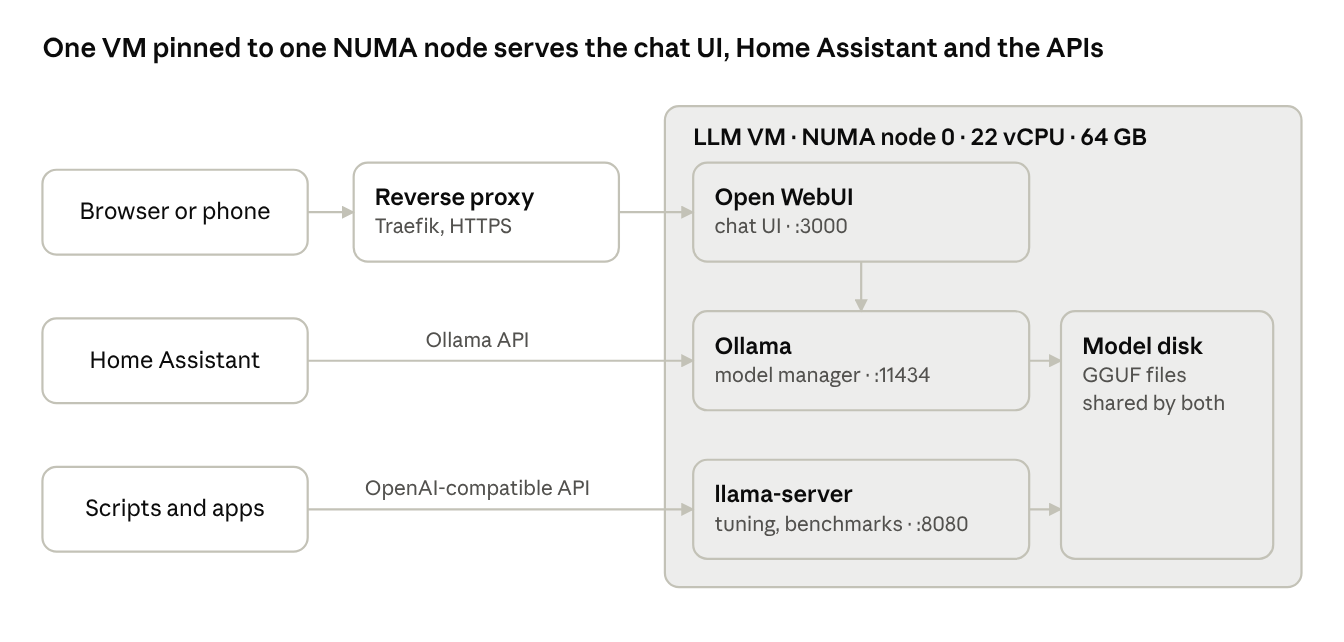
Ollama manages and serves the models, Open WebUI provides the chat interface, and llama.cpp’s llama-server is there for when I want to poke at the knobs directly. Both engines read the same GGUF files from one disk. Only Open WebUI goes through the reverse proxy; the two model APIs have no authentication whatsoever, so they stay firmly on the LAN.
Setting it up
The whole build is one Proxmox VM, one Docker Compose file and one llama.cpp build. Of the three, the VM configuration is the one worth getting right; the rest is plumbing.
1. The VM: pin it to one NUMA node
I created a Debian 13 VM from the official cloud image and let cloud-init handle the user, SSH key and static IP. These are the settings that actually affect performance:
cpu: host
sockets: 1
cores: 22
numa: 1
affinity: 0-21,44-65
numa0: cpus=0-21,hostnodes=0,memory=65536,policy=bind
memory: 65536
balloon: 0
cpu: hostpasses AVX2 and FMA through to the guest. Proxmox’s defaultkvm64CPU type hides them, and llama.cpp quietly falls back to much slower code paths. Nothing warns you; it’s just slow.affinitypins the VM’s 22 vCPUs to the physical cores (and their hyperthreads) of socket 0.numa0 ... hostnodes=0,policy=bindforces all 64 GB of guest RAM onto socket 0’s memory. This is the step people skip: pinning the CPUs alone isn’t enough, because Linux is perfectly happy to allocate memory on the other node.- 64 GB, not more: socket 0 had about 77 GB free. A bigger VM would spill onto the remote node and give back the bandwidth we just fought for.
balloon: 0stops Proxmox from helpfully reclaiming memory that a loaded model is in the middle of using.
Trust, but verify: I checked the result from the host by summing the VM’s pages per node in /proc/<pid>/numa_maps. The answer was 63.1 GB on node 0 and 0.0 GB on node 1, which is about as clean as these things get.
Models go on a separate 300 GB disk with backups turned off. They can always be downloaded again, and there’s no reason to fill the backup server with tens of gigabytes of weights.
2. Ollama and Open WebUI in Docker
services:
  ollama:
    image: ollama/ollama:0.40.7
    environment:
      - OLLAMA_NUM_PARALLEL=1
      - OLLAMA_MAX_LOADED_MODELS=1
      - OLLAMA_KEEP_ALIVE=30m
    volumes:
      - /srv/models/ollama:/root/.ollama
    ports:
      - "11434:11434"

  open-webui:
    image: ghcr.io/open-webui/open-webui:v0.12.3
    environment:
      - OLLAMA_BASE_URL=http://ollama:11434
    volumes:
      - /srv/appdata/open-webui:/app/backend/data
    ports:
      - "3000:8080"
On a CPU, parallel requests simply split the same memory bandwidth, so I allow one request and one loaded model at a time. And do pin the image tags: both projects ship releases every few days, and “latest” is not a version.
3. llama.cpp from source
git clone --depth 1 https://github.com/ggml-org/llama.cpp
cd llama.cpp
cmake -B build -DGGML_NATIVE=ON -DCMAKE_BUILD_TYPE=Release
cmake --build build -j 22 --target llama-cli llama-server llama-bench
GGML_NATIVE=ON compiles for the exact CPU it’s built on. A small trick worth knowing: Ollama stores models as ordinary GGUF files under models/blobs/, so I symlinked them for llama.cpp rather than downloading everything twice. The blob for each model is the layer with media type application/vnd.ollama.image.model in its manifest.
llama-server runs as a systemd service, which gives me a second OpenAI-compatible endpoint to experiment against.
Results: which models are actually usable
The star of the show is the 30B mixture-of-experts model: it generates at 24 tokens per second, twice as fast as the dense 8B, because it only reads about 3B parameters per token.
A quick note on method: all numbers come from llama-bench with 22 threads, a 512-token prompt and 128 generated tokens, averaged over three runs, and all models use the Q4_K_M quantization. Load times are from Ollama’s first request after the model had been unloaded.
| Model | File size | Prompt (tok/s) | Generation (tok/s) | Load time (cold) |
|---|---|---|---|---|
| Llama 3.2 3B | 1.87 GiB | 166 | 26.1 | 4 s |
| Qwen3 8B | 4.86 GiB | 69 | 11.7 | 8 s |
| Qwen3 30B-A3B (MoE) | 17.28 GiB | 102 | 24.3 | 32 s |
For dense models, generation speed is, to a surprisingly good approximation, memory bandwidth divided by model size. Qwen3 8B reads 4.86 GiB per token at 11.7 tokens per second, which works out to about 61 GB/s, or 80% of the socket’s theoretical 77 GB/s. The practical upshot: you can predict a dense model’s speed from its file size before you’ve even downloaded it.
The MoE model breaks that rule, and in your favour. It holds 30B parameters (17 GiB) in RAM but activates only about 3B of them for each token, so it runs at small-model speed while giving much better answers. If you have a CPU with plenty of RAM and no GPU, MoE models are about the best deal going.
The hidden cost is load time. The 30B model takes about half a minute to read from a SATA SSD the first time it’s used after being unloaded, which is just long enough to wonder whether something has crashed.
Results: thread count
This was the most instructive experiment of the lot. Generation speed stops improving at around 16 threads, while prompt processing keeps scaling all the way to 22. And going past the vCPU count is, to use the technical term, a disaster.
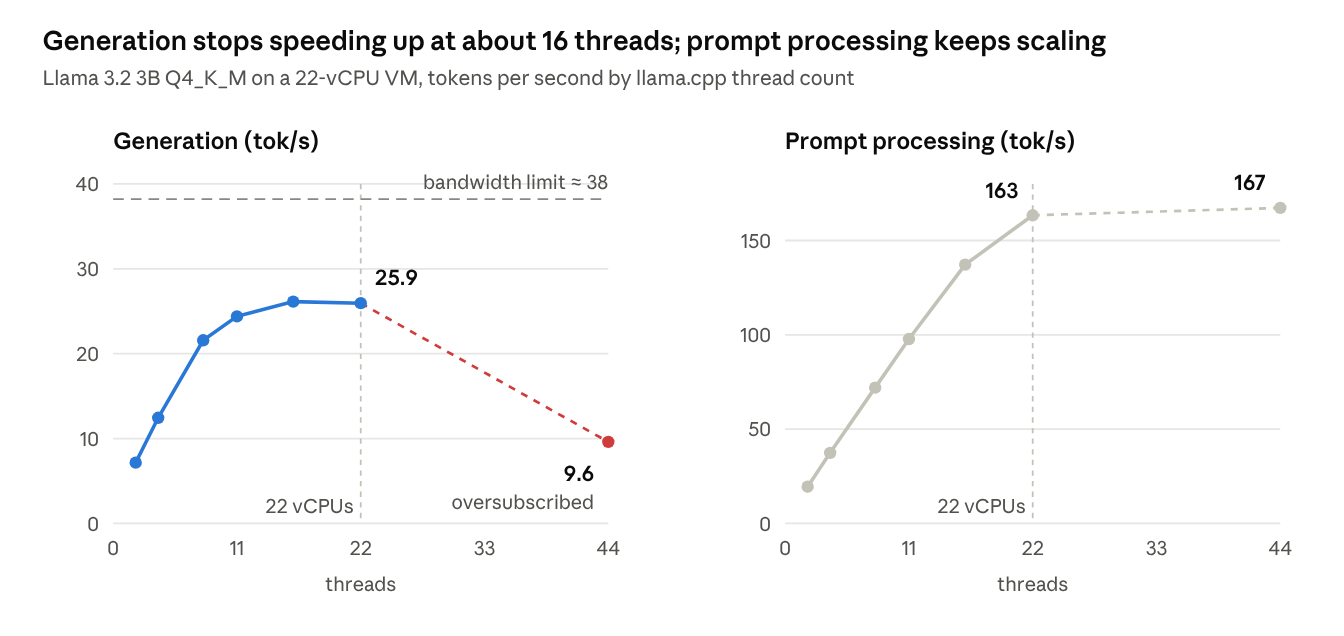
The two phases are limited by different things. Prompt processing works on many tokens at once, so it’s limited by arithmetic, and every extra core helps. Generation produces one token at a time and has to stream all of the weights from RAM for each one; once about 16 cores are reading, the memory bus is saturated and any further threads just queue politely. Qwen3 8B shows the same plateau: 11.2, 11.8 and 11.7 tokens per second at 11, 16 and 22 threads.
The dashed line is the theoretical ceiling for this model: 76.8 GB/s divided by its 2.0 GB of weights. Real generation reaches about two-thirds of it, which is respectable for actual hardware doing actual work.
At 44 threads, double the vCPUs, the threads fight over the same cores and generation collapses to 9.6 tokens per second. The rule is simple: set threads to the number of vCPUs (llama.cpp’s -t), or a little lower if the VM has other work to do.
Results: quantization
Smaller weights generate faster, which is unsurprising once you’ve accepted that we’re bandwidth-bound: going from 16-bit to 8-bit nearly doubles generation speed, and 8-bit to 4-bit buys another 50%.
Same model (Llama 3.2 3B), three precisions, 22 threads, three runs each:
| Precision | File size | Prompt (tok/s) | Generation (tok/s) | Bandwidth used |
|---|---|---|---|---|
| Q4_K_M (about 4.8 bits/weight) | 1.87 GiB | 170 | 25.7 | 52 GB/s |
| Q8_0 (8.5 bits) | 3.18 GiB | 108 | 17.1 | 58 GB/s |
| F16 (16 bits) | 5.98 GiB | 127 | 9.2 | 59 GB/s |
“Bandwidth used” is simply file size × generation speed. It stays close to 55 GB/s across all three, which is about as direct a confirmation as you’ll get that generation is limited by memory bandwidth rather than arithmetic.
Prompt processing tells a different story, and the F16 row is the interesting one. F16 beats Q8_0 because 16-bit matrix maths needs no unpacking, whereas quantized formats spend compute converting weights back to floats. Prompt processing is compute-bound, so that overhead shows up; generation is bandwidth-bound, so it vanishes.
For chat on a CPU, Q4_K_M is the sensible default. The quality loss at 4 bits is small for most models and the speed gain is substantial. I’d reach for Q8_0 when quality matters more than speed, for example coding help from a small model.
Results: long conversations get slower
Long conversations come with a tax. At 16K tokens of context, generation drops to a quarter of its starting speed, from 26 to 6.8 tokens per second.
The setup: llama-bench -d measures the speed of the next 512 prompt tokens and 128 generated tokens after the context already holds a given number of tokens. Model: Llama 3.2 3B Q4_K_M, 22 threads.
| Context already filled | Prompt (tok/s) | Generation (tok/s) |
|---|---|---|
| 0 | 167 | 26.2 |
| 2,048 | 124 | 19.5 |
| 8,192 | 76 | 11.3 |
| 16,384 | 45 | 6.8 |
The culprit is attention. Every new token has to attend to every earlier one, so the model reads the KV cache as well as its weights, and on a small model that cache grows fast. For Llama 3.2 3B it’s about 112 KiB per token, so at 16K tokens it’s about 1.75 GiB, nearly as large as the 1.87 GiB of weights, and attending over it costs compute too.
In practice, long chats, large uploaded documents and Home Assistant’s long entity prompts all pay this tax. Start a new chat when the topic changes, and keep RAG chunks and system prompts short.
Home Assistant as a voice agent
Short version: it works, but at 23–36 seconds per answer it isn’t usable for voice yet. Nobody wants to wait half a minute to find out whether the vacuum is docked.
Home Assistant has a built-in Ollama integration. I pointed it at the VM, created a conversation agent on Llama 3.2 3B (the fastest of my models) and gave it the Assist API so it can see and control exposed devices. Then I asked it two questions:
| Question | Answer | Time |
|---|---|---|
| “What time is it?” | Correct | 36 s |
| “Is the vacuum docked?” | Wrong: talked about the dock’s dust-emptying instead | 23 s |
The model generates at about 26 tokens per second, so the answer itself takes a second or two; the real culprit is the prompt. Home Assistant sends a description of every exposed entity with each request, which runs to thousands of tokens, and reading those at 170–200 tokens per second is where the time goes.
The wrong answer is a capacity problem: a 3B model just isn’t very good at picking the right entity and tool. A larger model would answer better, but it would read the prompt even more slowly, so on this hardware you can’t simply buy your way out.
Things that make it more usable:
- Expose only the entities you actually want to control by voice. A shorter prompt is by far the biggest speed-up.
- Turn on “Prefer handling commands locally” in the Assist pipeline. Home Assistant’s built-in intent engine handles simple commands instantly, and only requests it doesn’t understand go to the LLM.
- Keep the model loaded (
keep_alive: -1), so the first request doesn’t pay the load time on top of everything else.
Lessons learned
In hindsight, most of what I got wrong came from treating a CPU like a slow GPU, rather than what it really is for this workload: a bandwidth-limited machine.
- Never use more threads than vCPUs. With 44 threads on a 22-vCPU VM, Llama 3.2 3B’s generation fell from 26 to 9.6 tokens per second. The threads fight over the same cores, and every token waits for the slowest one.
- Pin the memory, not just the CPUs. CPU affinity without a NUMA memory binding still lets the guest’s RAM land on the other socket. Check where it actually landed (
numastat, or/proc/<pid>/numa_maps) rather than assuming. - Size the VM to the node, not the host. 256 GB in the box doesn’t make a 96 GB VM a good idea if it won’t fit in one node’s free memory.
- **Use
cpu: host.** Proxmox’s default CPU type hides AVX2 from the guest, and nothing tells you. - Thinking models feel slow even when they’re fast. Qwen3 writes hundreds of hidden reasoning tokens before answering. At 23 tokens per second that’s 30–60 seconds before the first visible word, which feels like an eternity in a chat window. Use
/no_thinkfor quick questions. - The first request pays the load time. Loading the 18 GB MoE model takes about 30 seconds from SSD. With only one model allowed in memory, switching models in the UI (or a Home Assistant request for a different model) means paying it again.
- Open WebUI makes extra requests. After each answer it quietly asks the same model for a chat title, tags and follow-up suggestions. With one request at a time, those queue up behind your next question. Turn them off, or give them a small task model.
- Neither API has authentication. Ollama and llama-server will accept anything that reaches the port. Keep them on the LAN, and expose only Open WebUI, which has its own logins, through the reverse proxy.
- Create the Open WebUI admin account immediately. The first account to sign up becomes admin, so don’t leave that door open.
- Watch your DNS caches. My browser held on to a stale answer from while I was setting up a record, and cheerfully sent me to the wrong machine until I flushed the Windows DNS cache. Not every problem is an interesting one.
Conclusion
If you have an old server with lots of RAM gathering dust, you can learn local LLMs on it today. Pick MoE models, pin the VM to one NUMA node, and measure everything; your intuitions about which numbers matter will probably be wrong, as mine were.
To be fair about the limits: a CPU-only setup is good for chat, coding help, API experiments and understanding inference. It isn’t good for low-latency voice control, or for models much beyond 30B total parameters at a comfortable speed.